Serve customers faster, with full context and AI support
Manage tickets, SLAs and omnichannel support in one place. Every service rep sees the full customer history, and AI agents suggest what to do next.
- Deployment in 6–8 weeks
- SLA, routing and escalations without code
- Certified Creatio Level IV partner
SOUND FAMILIAR?
“The customer calls, emails and chats — and every agent sees something different.”
Customer Service Manager, B2B
“We find out about an SLA breach after the fact — too late to do anything.”
COO, manufacturing company
“The agent starts from scratch on every ticket — the customer has to explain the history again.”
Operations Director, distribution
AI IN CUSTOMER SERVICE
AI agents help service reps resolve cases faster
For customer service, Creatio describes a set of AI agents that classify, suggest and guide the rep through a case. Here are the main ones.
Case resolution agent
Summarizes the case and suggests a resolution before the problem grows.
Knowledge base agent
Summarizes information, creates articles for cases and recommends the right content to reps and customers.
Case classification agent
Assigns a category and priority to the case so it reaches the right person.
Service playbook agent
Guides the rep through the procedure step by step, with articles matching the stage of the case.
Next best action agent
Suggests to the rep what to do next in a given case.
SLA and escalation agents
Detect the risk of an SLA breach, recommend corrective actions and escalate the case at the right time.
What else agents do in service
Contact center
They triage cases, identify intent and either resolve them or route them to the right experts.
Self-service
Chatbots and virtual assistants handle some customer requests around the clock.
Field work
Service orders assigned to technicians by skills, availability and location.
Preventing problems
Identifying recurring incidents and their causes, with suggested preventive actions.
The scope of agents depends on the platform version and license. We will check with you what is available in your instance.
CREATIO SERVICE MODULES
A complete customer service center
Ten areas that together form a coherent workspace for the service department — from first contact to satisfaction analytics.
Every agent starts with full context — without asking the customer for history
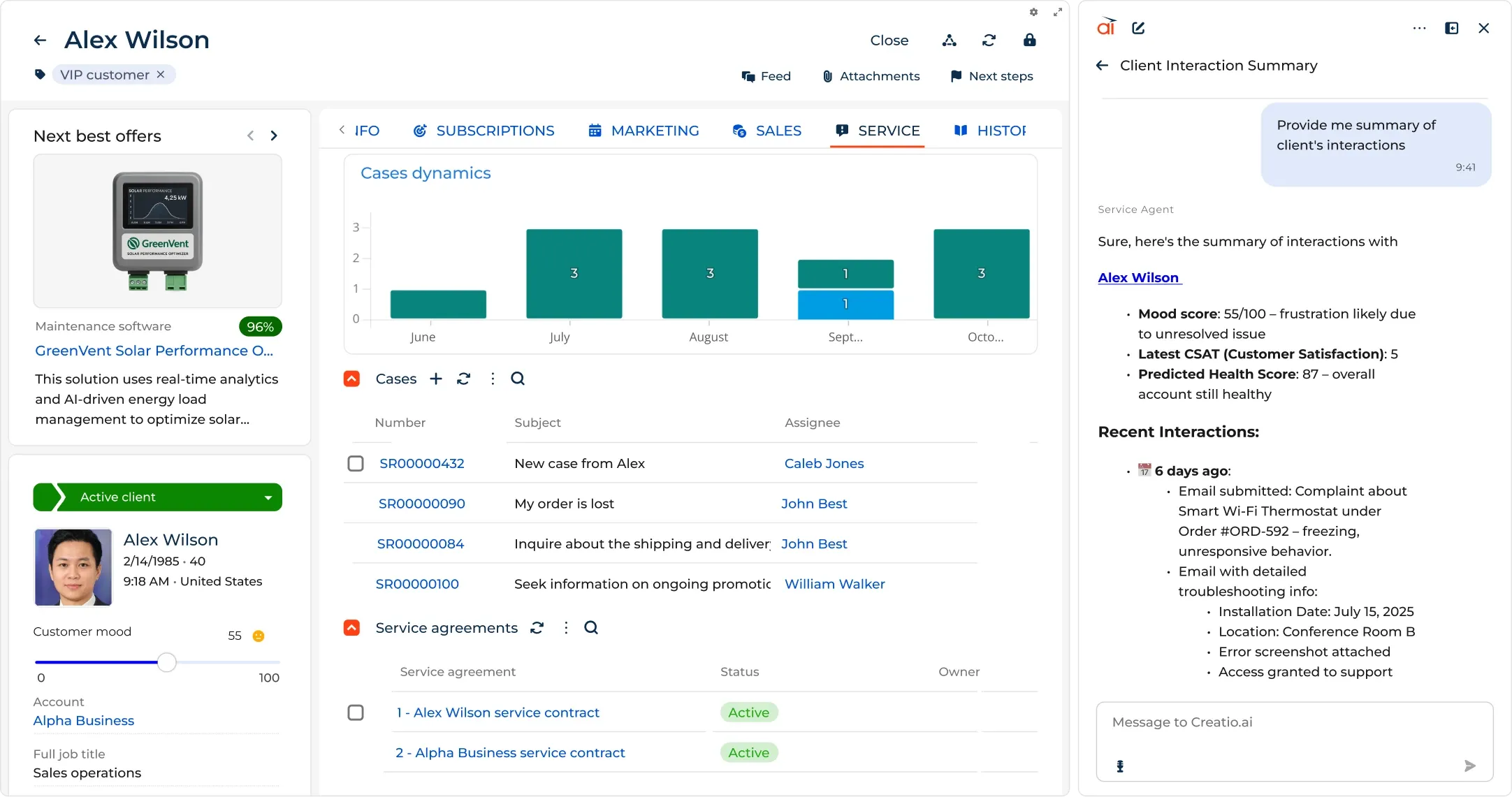
A unified customer database with ticket, purchase, interaction and active SLA history. The agent sees everything on one screen before picking up the phone.
- Purchase, ticket and interaction history in one customer view
- Customer segmentation by priority, industry and SLA tiers
- Links to products, the service contract and renewal dates
- Relationship status visibility: customer value, CSAT and churn risk
One agent, many channels — one customer history
Receive and send communication via email, phone, chat, customer portal and WhatsApp directly from Creatio. History goes automatically to the customer record — regardless of channel.
- Email, phone, chat, WhatsApp and portal from one interface
- Communication history automatically linked to the ticket record
- Switching between channels without losing conversation context
- The customer doesn’t know they switched agents — the agent sees it all
From registration to closure — no manual work, no manual routing
Tickets from email, phone, chat and portal enter the system automatically. AI classifies priority, selects the service and assigns the right agent in seconds.
- Automatic ticket registration from all channels
- AI routing: priority, service and group classification without manual rules
- Flexible service flows configured no-code in the Process Designer
- Automatic escalations with a supervisor alert before the SLA is breached
The right answer available instantly — no digging through documents
A unified knowledge base with FAQs, specs and procedures. AI analyzes the active ticket and suggests matching articles before the agent starts writing a reply.
- Knowledge base for agents, customers and partners with configurable access
- AI suggests articles matching the active ticket content
- Self-service customer portal: search and ticket registration
- Update articles without IT — a no-code editor for everyone
Every task planned — no customer without a follow-up
Calendar and Tasks let agents organize work and track follow-ups. Supervisors see team workload in real time, while AI agents take over the routine.
- Calendar with day, week and month views for each agent
- Tasks linked to tickets — context and history at hand
- Automatic task creation from flows (e.g. “Call after 3 days”)
- Team workload view for the supervisor — who has too much, who too little
Every service contract tailored to the customer — and monitored live
A central service catalog and configurable SLA levels per customer, partner or ticket priority. Notifications before the SLA is breached, not after.
- Central service catalog with response and resolution times
- SLA level configuration: Premium, Standard, Basic per customer or type
- Automatic notifications before an SLA breach — not after
- SLA compliance report per customer, agent and ticket type
One screen for the agent — the whole service center under control
Configurable ticket queues, an agent desktop with the active ticket and customer history, KPI tracking and a self-service portal for external customers.
- Dynamic and static queues per team, product or channel
- Agent desktop: ticket + customer + SLA + history in one window
- External customers register tickets and track status via the portal
- The supervisor sees the whole queue and agent workload live
Full visibility of the service center in real time
Live analytics on agent and supervisor dashboards: CSAT, FCR, SLA compliance, processing time. Identify weak links before they affect customer retention.
- Real-time KPIs: CSAT, FCR, SLA compliance, avg. closure time
- Dashboards per agent, per customer and per channel
- Trend reports — week-over-week and month-over-month
- Supervisor alerts on deviations from norms
Capable AI agents for exceptional customer service
AI agents integrate data from all channels, instantly giving teams the right context and personalized solutions — without manual steps or switching screens.
- Detecting similar tickets — agents resolve faster, FCR grows
- ML models trained on the customer’s historical system data
- No extra coding — AI ready to use after deployment
Hundreds of ready-made solutions — extend without development
The Creatio Marketplace offers ready-made plugins, templates, connectors and extensions that speed up integrations and deployment. Download, configure, launch — no code.
- 800+ ready-made solutions: plugins, process templates, connectors
- Integrations with Jira, Zendesk, WhatsApp, Microsoft 365 and more
- Service process templates to import in one click
- Extend the service center without involving IT
DEPLOYMENT PROCESS
From decision to a working service center in 6–8 weeks
We start with the key channels and most urgent processes — the first tickets enter the system during deployment.
Analysis and design
We map ticket types, SLA rules, team structure and support channels. We define routing, priorities and escalations — before configuring anything.
- → Ticket type map
- → SLA matrix per customer/type
- → Routing and escalation tree
- → Product and category catalog
Configuration and integration
We configure queues, SLAs, routing and omnichannel. We integrate email, phone and chat. We migrate ticket history. First real tickets in sprint 2.
- → Email, phone, chat integration
- → SLA and escalation configuration
- → Knowledge base — article import
- → Ticket history migration
Launch and adoption
We train agents and supervisors — from queue handling to CSAT dashboards. Hypercare for 30 days: we respond to questions and optimize rules.
- → Training per role (agent, supervisor)
- → SLA and CSAT dashboards
- → Routing rule calibration
- → 30-day hypercare
RESULTS
What changes after deploying Creatio Service
35%
shorter average ticket resolution time
avg. Optingo clients
95%+
SLA compliance after the first month
post-deployment data
+0.8
CSAT increase after deployment (1–5 scale)
client surveys
6–8 wks
from kick-off to go-live
vs 12–18 months traditionally
FOR WHOM
For every role in B2B customer service
Creatio Service meets the needs of front-line agents, supervisors and a board measuring NPS and retention.
Customer Service Manager / Director
100–1000 employees · B2B
“I hear about an SLA breach from the customer, not the system. I need alerts before it’s too late.”
- SLA alerts before a breach, not after
- Real-time CSAT and FCR dashboard
- Team workload and queue distribution
- Automatic routing eliminates manual assignment
COO / Operations Director
200–2000 employees
“Customer service is the last department without systematic process management. Everything by email and phone.”
- Standardized service processes across all branches
- Measurable KPIs: SLA, CSAT, FCR, response time
- Visibility of team workload and bottlenecks
- Integration of service with the sales CRM
CEO / Owner
50–500 employees
“I’m losing customers to poor service. I don’t know which customer is unhappy until they leave.”
- AI detects churn risk before a customer leaves
- NPS and CSAT — a hard satisfaction metric
- Customer service as a competitive advantage
- One system: sales + marketing + service
GET STARTED
Ready to see how Creatio Service raises your team’s SLA and CSAT?
A 45-minute demo — we show case management, SLA routing and supervisor dashboards on examples from your industry.
- No commitment
- Free demo
- We respond in 24h